Joining your virtual visit is simple — there’s nothing to download. Just click the secure link we email you at the time of booking your visit. If you can’t locate the email you can also find your Zoom link in your patient profile. Click on the 3 vertical dots then copy and paste your Zoom link into your browser and click return.
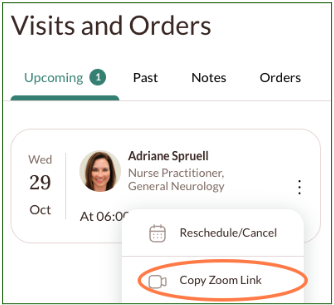
You can test the link anytime beforehand, but keep in mind it won’t actually connect until the real visit — so don’t worry if you don’t see anything yet.
On the day of your appointment, take a moment to find a quiet, well-lit space before you join — it helps your provider see and hear you clearly. Click on the Zoom link a few minutes prior to your start time and Zoom will open and place you in a virtual waiting room. Your provider will let you in.
If you need help at any point, email support@neurahealth.co, tap “Get Care” in the Neura app, or call (201) 275-1141 — we’re here for you.